
Google Ads Made Brand Kits an AI Input—So We Tested a Video Agent With One
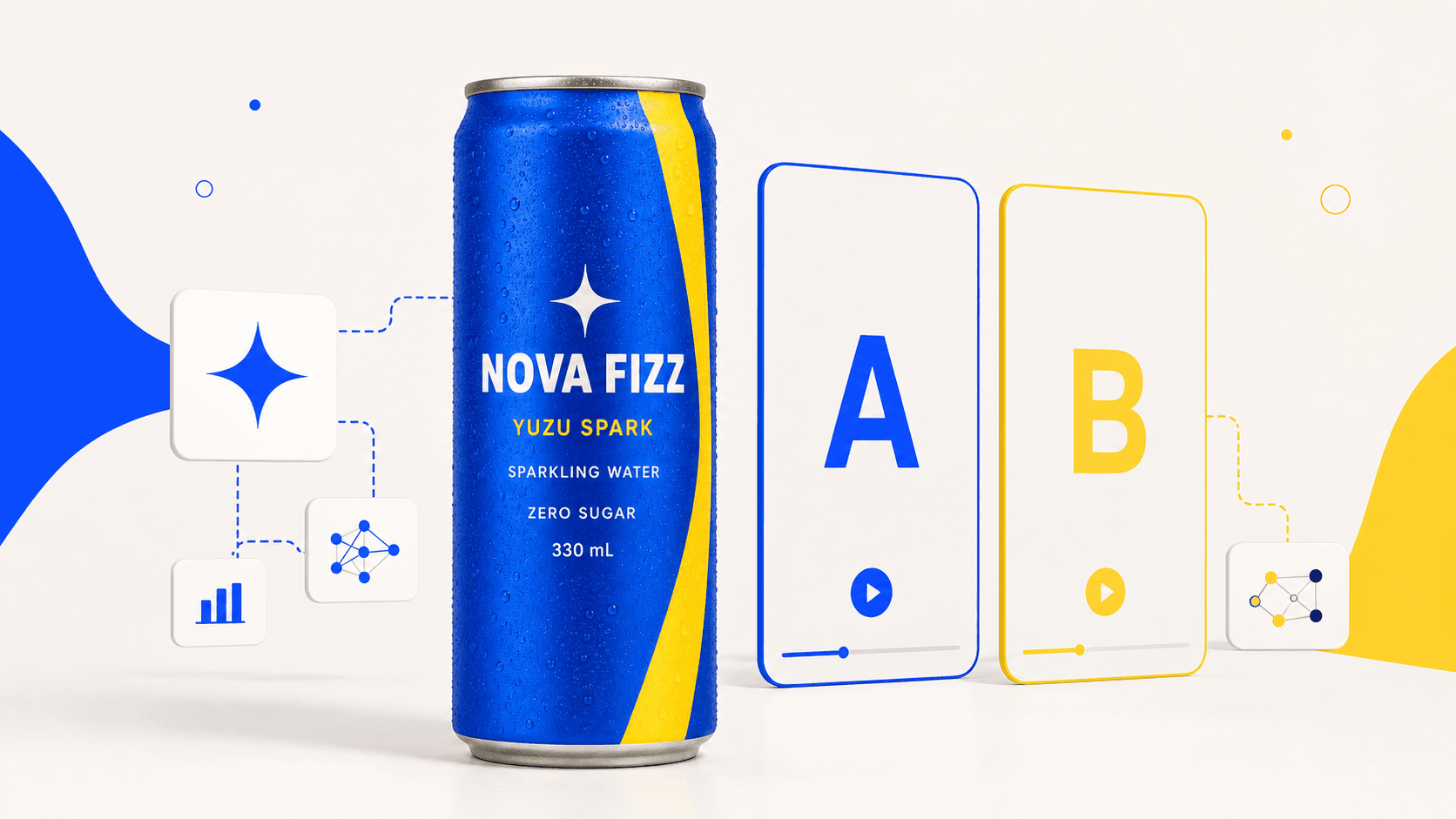
AI Overview
What changed at Google?
This is not a Google Search ranking algorithm update. It is a creative-production change inside Google Ads: Gemini Omni in Asset Studio can import brand guidelines and a URL, generate video concepts, refine scenes with prompts, and export multiple ad formats.
What did we test?
We gave Video Agent three assets for a fictional sparkling-water brand—one product packshot, one transparent logo, and one brand board. It generated an eight-second vertical product ad, then built a controlled B version with one prompt change.
Which version won?
Version A won our editorial review. It kept the can, logo, cobalt-and-yellow palette, and packaging hierarchy more readable. Version B added explicit safe-zone instructions, but those extra instructions did not improve the finished composition.
Ready to create your own AI video?
Free credits on signup. Plans from $20/month.
What is the practical lesson?
Use generation for product motion, lighting, fruit, bubbles, and camera movement. Use a deterministic editing layer for pixel-critical CTA, prices, legal copy, and final logo placement. More prompt text is not automatically more control.
Quick Answer: Video Agent Brand-Kit Test at a Glance
Short on time? The Agent successfully turned three disconnected brand assets into a controlled product-video test. A was the stronger source clip; B proved that numerical layout instructions should not be treated as guaranteed placement.
| Dimension | Version A | Version B |
|---|---|---|
| Core approach | Product and packaging locks with qualitative spacing | Same locks plus a central package safe zone and bottom 18% CTA zone |
| Product anchor | Same product packshot as the first frame | Same product packshot as the first frame |
| Can identity and palette | Stable and selected | Stable overall |
| Packaging readability | More consistently readable | Fruit and water competed with central/lower label text |
| CTA behavior | Appeared later; readable, though contrast could improve | Appeared too close to package information instead of staying in the reserved zone |
| Generation settings | 9:16, 720 × 1280, 8.042s, H.264, audio off | Identical |
| Cost evidence | Approval card quoted 19 credits | Approval card quoted 19 credits; observed charge matched 19 |
| Editorial decision | Use as the source clip | Keep as a learning variant; do not ship |
What Google Ads Actually Changed
Google's current Gemini Omni announcement for Google Ads describes a four-step workflow: import brand guidelines and a URL, generate concepts from a prompt or static assets, refine scenes, voiceovers, pacing, and aspect ratios, then export assets into Google and YouTube campaigns. Google also says the feature is rolling out globally at no additional cost inside Google Ads.
The important shift is not simply that another video model exists. Brand inputs are becoming part of the generation workflow. The marketer's problem therefore changes from “Can AI make a clip?” to three harder questions:
- Can the system identify which asset is the source of truth?
- Can it preserve packaging and identity while adding motion?
- Can it test variations without changing five variables at once?
Those are Agent problems as much as model problems. The same distinction between model quality and production workflow also appears in our Seedance 2.0 vs Higgsfield comparison. Here, we tested the workflow on a small brand kit instead of judging a polished demo reel.
What We Gave Video Agent
The fictional product was NOVA FIZZ Yuzu Spark, a cobalt-blue sparkling-water can with a yellow diagonal curve and a white four-point star. We deliberately used packaging with multiple text lines because label fidelity quickly exposes whether a workflow is genuinely brand-aware.
left=https://r2.seedance.tv/blog/ai-video-agent-brand-kit-test/nova-fizz-product-front.png
right=https://r2.seedance.tv/blog/ai-video-agent-brand-kit-test/nova-fizz-brand-kit-cover.png
left_label=Product packshot · Packaging source of truth
right_label=Brand board · Color and art direction
| Asset | Job in the workflow | What must not drift |
|---|---|---|
| Product packshot | Product identity and opening-frame anchor | Can shape, label hierarchy, text, color, condensation |
| Transparent logo | Spelling and symbol reference | NOVA FIZZ, four-point star, proportions |
| Brand board | Art direction | Cobalt blue, citrus yellow, off-white, bright/crisp/energetic tone |
A brand board should guide art direction, but it should not outrank the product photograph when the model decides what the real package looks like.
What Video Agent Actually Did
The strongest part of the workflow happened before the paid call.
First, the Agent converted the assets into a hierarchy of brand locks. The product photo became the packaging source of truth. The logo fixed spelling and symbol shape. The brand board supplied colors and visual tone.
Second, it transcribed the visible package text verbatim:
NOVA FIZZYUZU SPARKSPARKLING WATERZERO SUGAR330 mL
Third, it selected the product packshot as the first frame. Asking a video model to animate a real package is safer than asking it to redraw that package from a text description.
Finally, it turned a broad request—“make a bright vertical product ad”—into one approval-ready generation with explicit duration, resolution, aspect ratio, audio setting, CTA, camera direction, and forbidden changes. We kept audio off to isolate visual consistency; campaigns that need sound at generation time can compare the current AI video generators with native audio.
The reusable prompt structure looked like this:
PRODUCT LOCK
Use the first-frame product as the exact subject. Keep the can shape,
four-point star, cobalt body, yellow diagonal curve, and every package
line exactly unchanged: “NOVA FIZZ”, “YUZU SPARK”, “SPARKLING WATER”,
“ZERO SUGAR”, “330 mL”. One can only. No duplicated product.

CHANGE CHANNEL
Use a fixed camera with one gentle push-in. Add fresh yuzu slices,
fine bubbles, and a clean splash arc flowing upward around the can.

BRAND DIRECTION
Off-white background. Bright, crisp, energetic. High contrast and
minimal props. Avoid black-and-gold luxury styling, pastel styling,
or a busy decorative set.

CTA
Show “Taste the bright side.” near the bottom, clean sans-serif,
without covering the product.

NEGATIVE LOCKS
No package-text changes, invented branding, deformation, morphing,
flicker, watermark, extra logo, or duplicate can.
The useful detail is not the prompt's length. It is the priority order: identity first, one allowed motion system second, art direction third, and negatives last.
Head-to-Head: Brand Fidelity & Packaging
After reviewing A, we created B in the same Canvas with the same product image, model route, resolution, duration, aspect ratio, audio setting, camera move, and CTA. The only intended change was more explicit spatial language: keep fruit and splash outside the package-text area and reserve the bottom 18% as a clean CTA zone.
official=https://r2.seedance.tv/blog/ai-video-agent-brand-kit-test/agent-brand-kit-test-a.mp4
output=https://r2.seedance.tv/blog/ai-video-agent-brand-kit-test/agent-brand-kit-test-b.mp4
official_label=A · Brand locks + qualitative spacing
output_label=B · Explicit package and CTA safe zones
A was the better composition. NOVA FIZZ, the four-point star, the cobalt can, the yellow curve, and the lower packaging hierarchy remained recognizable and more consistently readable. B preserved the product identity overall, but fruit, water, and CTA placement competed with the middle and lower label area.
Verdict: A wins on direct usability. B remains useful evidence because all other major variables were held constant.
Head-to-Head: Prompt Control vs Layout Control
Version B added measurable-sounding instructions: a central package safe zone and a clean bottom 18% for CTA. The final artifact did not reliably obey that grid.
That does not mean spatial prompting is useless. It means a video generator is not a layout engine. “Bottom 18%” competes with the model's learned ideas about hero framing, product scale, splashes, and advertising typography. More clauses can help, but they do not create a pixel grid or guarantee every placement.
This is where the Agent is more valuable than a prompt rewriter. It can keep variables fixed, create a meaningful variant, compare the artifact against the goal, and identify when the next correction belongs to another production step.
Verdict: use prompts to control visual intent and motion. Use deterministic composition to control exact typography and coordinates.
Head-to-Head: Cost & Production Workflow
The approval card quoted 19 credits for each eight-second 720p run. The observed B-run balance change also matched 19 credits. We stopped after two clips because the comparison already answered the production question; a third full regeneration would have spent more without solving the pixel-level CTA issue.
Our evidence has three separate layers:
- The Agent session records the plan, prompt, parameters, and submission.
- The downloaded MP4 files prove the completed artifacts.
- The A-over-B decision is a human editorial judgment from frame-by-frame review, not an automated benchmark claim.
The cost-effective next pass is therefore:
- Keep A as the generated source clip.
- Remove model-drawn CTA from the final delivery if necessary.
- Add
Taste the bright side.as a deterministic text overlay. - Keep prices, legal copy, URLs, and final logo treatment in the same editing layer.
- Export 9:16 first, then derive additional aspect ratios from the approved creative. For a resolution-first finishing workflow, see our Seedance 2.5 4K tutorial.
Verdict: two controlled generations plus one deterministic finish are more efficient than repeatedly paying for whole-video reruns to fix one text layer.
Which Workflow Should You Choose?
✅ Choose Agent-led generation if:
- You have several brand assets but have not defined their roles
- Product identity and packaging must stay recognizable while the scene moves
- You want controlled A/B variants instead of unrelated rerolls
- The creative needs camera motion, lighting, atmosphere, particles, fruit, or liquid
- You want the system to stop when another tool is the better next step
✅ Choose deterministic finishing if:
- CTA must land at an exact position
- Price, discount, legal copy, URL, or QR code must be letter-perfect
- A logo needs pixel-precise size and clear space
- Multiple aspect ratios need predictable typography
- The source video is already good and only the overlay needs correction
Who Should NOT Keep Adding Prompt Rules?
Do not keep buying full reruns when the remaining problem is only text placement. If the product motion, lighting, and brand identity are already usable, route fixed copy to editing. Prompt C is not automatically cheaper—or more controllable—than finishing A correctly. If you are still deciding which campaign or content format to start with, these practical Seedance use cases provide a useful planning map.
Conclusion
The Video Agent succeeded at the parts that matter most early in production: it turned an unstructured brand kit into clear asset roles, anchored the real package as the first frame, preserved the brand's recognizable identity, created a controlled A/B variant, and helped us stop after the test produced a decision.
The winning result was not the prompt with the most rules. It was the workflow that made the rules testable. For teams creating product ads at volume, that is the practical advantage of an Agent: fewer ambiguous handoffs, fewer uncontrolled reruns, and a clearer path from brand assets to an approved clip.
Ready to create your own AI video?
Turn ideas, text prompts, and images into polished videos with Seedance. If this article helped, the fastest next step is to try the product.
Free credits on signup. Plans from $20/month.
Related Articles
More posts in the same locale you may want to read next.
Seedance App Preview Video Generator 2026: Create App Store and Product Launch Clips
Use Seedance to turn app screenshots, feature copy, and launch goals into App Store previews, Google Play promo videos, and product launch clips.
Read article
Dreamina Video Extension Prompt Examples: Continue a Clip Without Drift
Copy Dreamina video extension prompts for a character, product, camera move, and scene ending. Learn the upload workflow and review every clip join.
Read article
HeyGen Translation Speed vs Precision: Which Mode Should You Use?
Choose HeyGen Speed, Precision or Audio Only for video translation using source-shot complexity, lip-sync risk, credits and a repeatable one-language review workflow.
Read article